Context
What is Generative Edit?
Generative Edit is a core Samsung AI feature that lets users remove, reposition, and resize objects, while naturally filling in the empty areas created when straightening a photo.

Background
How Could We Make Erase More Prominent?
Generative Erase saw strong user response shortly after launch. To better showcase Galaxy AI’s image editing capabilities, I wanted to design an experience that made Erase more visible and easier to discover.
Experiment
Make Erase Stand Out with AI
I placed Erase at the top to make it easier to discover, and had AI automatically select the object to remove so users could generate the result right away.
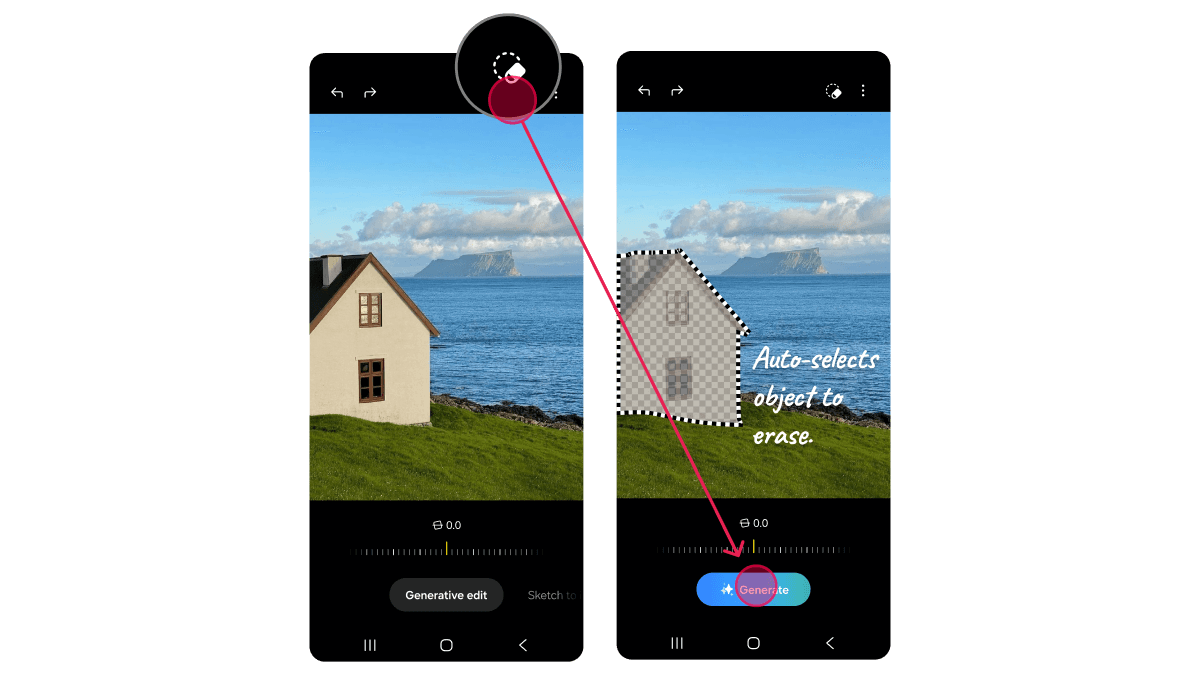
Unexpected Result
Clicked, But Didn’t Keep Using It
The auto-selection button had a 48% click-through rate in its first week, and we expected it to stabilize around 20% after the third week. Instead, it dropped to 13%. Users were choosing manual object selection much more often than we expected.
User Interview
Users Preferred Manual Selection Over AI
I interviewed 30 users to understand why they chose to select objects themselves. We found that users valued precise selection and the feeling of directly editing the image, while AI could not always fully understand their intent.

User Research
The Process Matters
I reviewed YouTube videos to see how users selected objects. Even in short videos, creators showed themselves selecting objects by hand, not just the final result.
Insight
Keep Users in the Edit
I tried using AI to select objects and make Erase more prominent, but users valued taking part in the edit themselves over automation. I shifted the focus to making that hands-on experience clearer and more engaging.

Final Design
Make Erase Stand Out
Based on the higher click-through rate when the Erase button was visible, I chose to make available tools more explicit rather than hide them.
1
Erase as Default
I set Erase as the default so selected objects would be removed immediately, while keeping object selection in the user’s hands.
2
Clear Tools, Easy Switching
All tools stayed visible, with easy switching between them.

Before/After

Motion Interaction
I added motion to each step of the editing experience, from selecting and erasing to generating, reinforcing the sense that users were actively shaping the result.
Selection
As users draw over an object, the stroke naturally snaps to its contours. This makes the selection feel more precise and gives users greater confidence in the recognition.
Erasure
As users draw over an object, the stroke naturally snaps to its contours. This makes the selection feel more precise and gives users greater confidence in the recognition.
Generation
A scanning motion keeps the loading state engaging. The new image is then revealed from top to bottom, mirroring the erasing motion.
I defined the timing, speed, and behavior of each motion and created detailed interaction guidelines. I then worked with developers to code and prototype the interactions, iterating through testing and refinement.
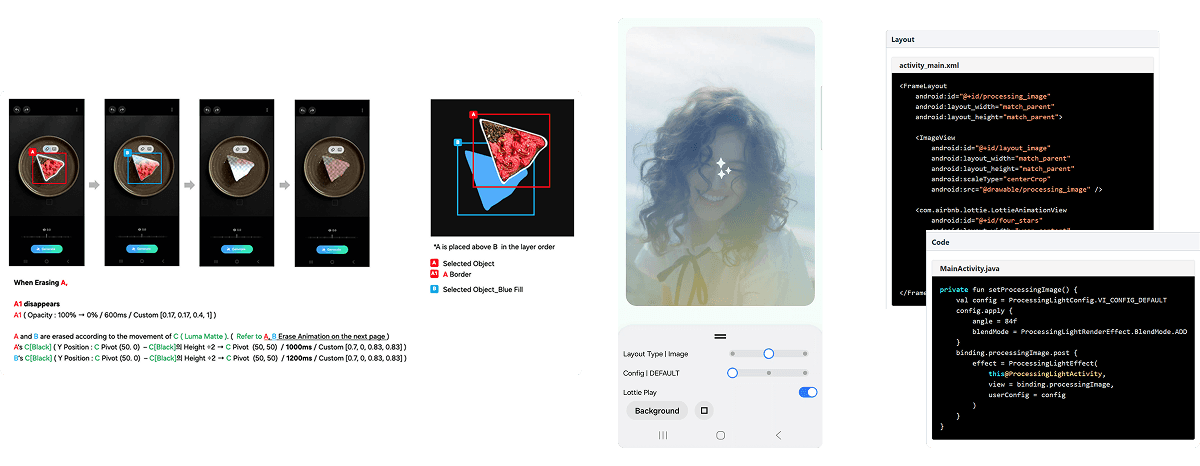
In Action
Outcome
58% Completion Rate
I surfaced the Erase icon and set it as the default, increasing Generative Edit completion from 43% to 58%. Motion interactions made the selection, erasure, and generation process more intuitive, reducing drop-off during editing from 22% to 14%.
From Generative Edit to a Galaxy AI Standard
The motion principles I designed for erasing, loading, and revealing the generated result later became a standard across Galaxy AI, extending to other AI features including text and video generation.
@ 2026 Grace Song
Linkedln